Flutter in_app_purchase vs purchases_flutter: which to use
Use in_app_purchase when you want to own everything and are ready to build a server; use purchases_flutter when you want a backend to verify purchases and track subscriptions for you. in_app_purchase is the flutter.dev plugin. It loads products, runs the purchase and hands you the store's receipt, and the rest is your job: Google's own codelab builds a Dart server with Cloud Firestore to verify purchases and follow renewals. purchases_flutter is RevenueCat's MIT-licensed SDK. It sends each purchase to a backend, which can be RevenueCat or an open-source server such as RevenueDot, and gives your app one answer to "is this user Pro?" on iOS and Android.
This post compares the two packages with code side by side, shows what each costs, and says when each one fits. Every Flutter, Google and RevenueCat fact links its source and was checked in October 2026.
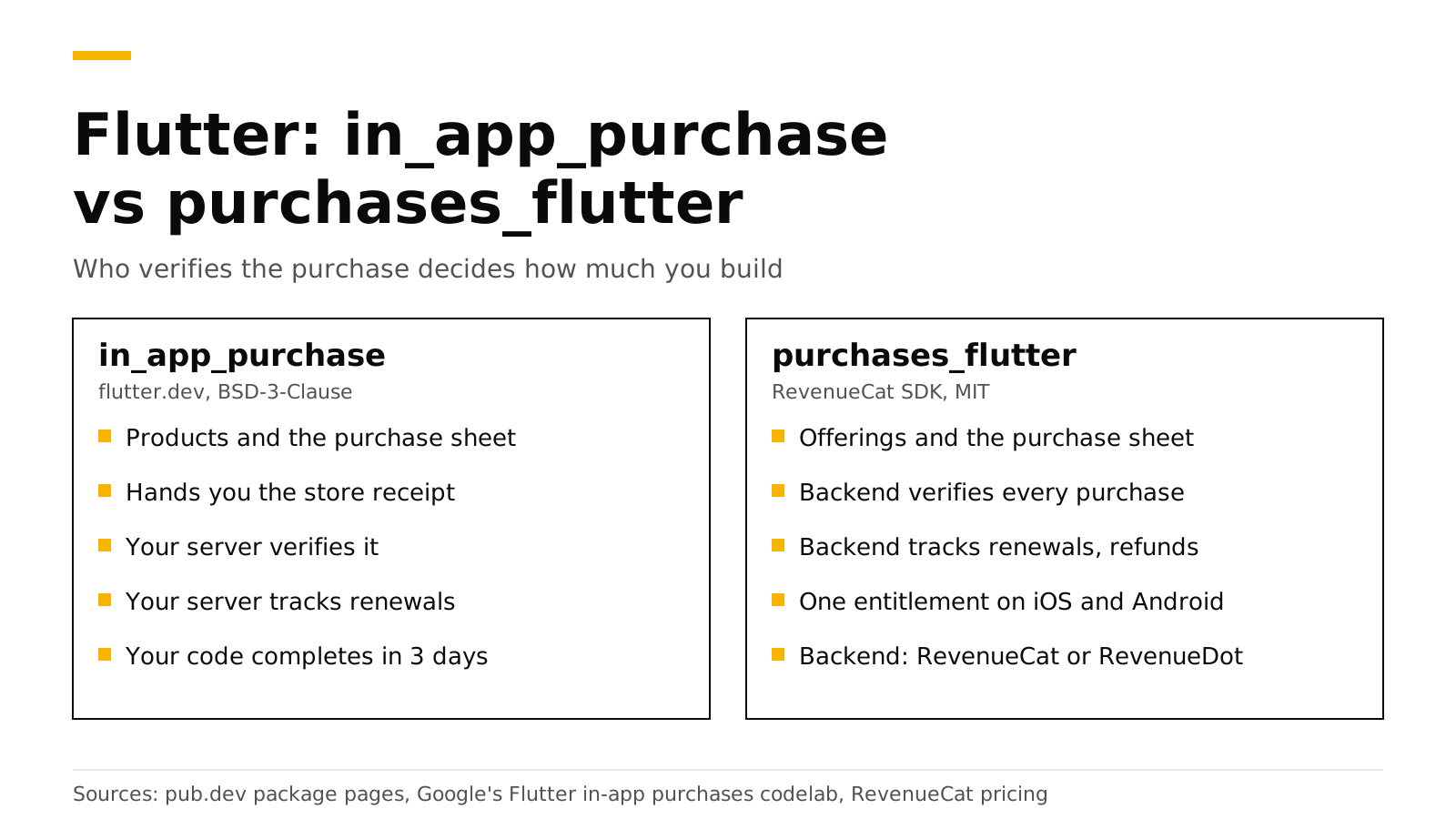
The short answer#
in_app_purchaseis published by flutter.dev under BSD-3-Clause, version 3.3.1, for Android, iOS and macOS (pub.dev). It does not verify purchases for you.purchases_flutteris published by revenuecat.com under MIT, version 10.14.0, for iOS, Android, macOS and web (pub.dev). It needs a backend that speaks RevenueCat's API.- Pick
in_app_purchaseif you sell on one store, already run a backend, or must not depend on any vendor. - Pick
purchases_flutterif you sell subscriptions on both stores and want entitlements, webhooks and charts without writing store server code. - Cost:
in_app_purchasecosts your engineering time.purchases_flutterwith RevenueCat is free up to $2,500 in monthly tracked revenue, then 1% (RevenueCat). With RevenueDot Cloud it is free up to $10,000, and self-hosting is free.
What does each package do?#
The two packages sit at different layers. in_app_purchase is a thin layer over StoreKit and Google Play Billing. purchases_flutter wraps the same store libraries and adds a client for a subscription server.
in_app_purchase |
purchases_flutter |
|
|---|---|---|
| Publisher and license | flutter.dev, BSD-3-Clause | revenuecat.com, MIT |
| Platforms | Android, iOS, macOS | iOS, Android, macOS, web |
| Load products and buy | Yes | Yes, through offerings and packages |
| Verify a purchase | Your server, against each store's API | The backend |
| Acknowledge Google purchases within 3 days | Your code calls completePurchase |
The backend |
| Renewals, refunds and billing failures | Your server, from store notifications | The backend |
| One entitlement across iOS and Android | Your server and your database | Built in (entitlements.active) |
| Webhooks, charts, paywalls, experiments | Build them | From the backend |
The in_app_purchase README is clear about the split. It tells you to call completePurchase "after verifying the purchase receipt and the delivering the content to the user", and points to Apple's and Google's own verification guides for that step (pub.dev). It also warns that failing to complete a purchase within 3 days "will result in a refund on Android".
What does the server behind in_app_purchase look like?#
Google's Flutter codelab, "Adding in-app purchases to your Flutter app", builds the full setup (Google codelab). Its parts:
- Sign-in with Firebase Authentication, so each purchase belongs to a user.
- A Dart backend that receives purchase tokens from the app.
- Verification against the Google Play Developer API and the App Store server, with service account credentials for each store.
- Storage of purchases in Cloud Firestore.
- Tracking of renewals and cancellations through Google Cloud Pub/Sub and App Store notifications.
The codelab explains why: with a server, "you can securely verify transactions", and users cannot unlock premium features by changing the device clock. That is the right design. It is also a lot of work for a small team, and the work never ends: both stores change their APIs, and every new edge case, such as grace periods, refunds, upgrades or account transfers, lands on your server. Our server-side validation guide shows how much code the verification step alone takes.
The same purchase, side by side#
With in_app_purchase#
import 'dart:async';
import 'package:in_app_purchase/in_app_purchase.dart';

final iap = InAppPurchase.instance;
late final StreamSubscription<List<PurchaseDetails>> purchaseSub;

void startStore() {
  // Every purchase, restore and update arrives on this stream.
  purchaseSub = iap.purchaseStream.listen(onPurchases);
}

Future<void> buyPro() async {
  // On Android, the ID is the Play subscription ID.
  final response = await iap.queryProductDetails({'pro_monthly'});
  final product = response.productDetails.first;
  // Subscriptions are bought as non-consumables.
  await iap.buyNonConsumable(purchaseParam: PurchaseParam(productDetails: product));
}

Future<void> onPurchases(List<PurchaseDetails> purchases) async {
  for (final p in purchases) {
    if (p.status == PurchaseStatus.purchased || p.status == PurchaseStatus.restored) {
      // Your server checks this token with Apple or Google and records access.
      final ok = await myServer.verify(p.productID, p.verificationData.serverVerificationData);
      if (ok) setPro(true);
    }
    if (p.pendingCompletePurchase) {
      await iap.completePurchase(p); // Within 3 days on Android, or Google refunds it.
    }
  }
}

// The Restore purchases button: restored purchases arrive on purchaseStream.
Future<void> restore() => iap.restorePurchases();
myServer.verify is the part you write. It holds your App Store key and your Google service account, calls each store, stores the result, and must later learn about renewals and refunds from store notifications.
With purchases_flutter and RevenueDot#
import 'dart:io' show Platform;
import 'package:purchases_flutter/purchases_flutter.dart';

Future<void> startStore() async {
  // One line of setup sends the SDK to RevenueDot instead of RevenueCat.
  await Purchases.setProxyURL('https://api.revenuedot.app');
  await Purchases.configure(
    PurchasesConfiguration(Platform.isIOS ? 'appl_YourKey' : 'goog_YourKey'),
  );
}

Future<bool> buyPro() async {
  final offerings = await Purchases.getOfferings();
  final package = offerings.current?.monthly;
  if (package == null) return false;
  final result = await Purchases.purchase(PurchaseParams.package(package));
  return result.customerInfo.entitlements.active.containsKey('pro');
}

// The Restore purchases button
Future<bool> restore() async {
  final info = await Purchases.restorePurchases();
  return info.entitlements.active.containsKey('pro');
}
There is no verify function to write. The backend verifies the purchase with Apple or Google, acknowledges Google purchases, receives store notifications, and answers with the customer's entitlements. Drop the setProxyURL line and the same code talks to RevenueCat. Our Flutter tutorial builds a full paywall with this package.
What goes wrong most often?#
Each package has its own traps. Knowing them up front saves a rejected build or a week of support email.
With in_app_purchase, from its README (pub.dev):
- Forgetting
completePurchase. On Android the purchase is refunded after 3 days. On iOS and macOS the purchase stays in Apple's queue, is delivered to the app again and again, and blocks the next purchase of the same product. - Expecting consumables to restore. Google Play treats a consumed product as no longer owned, so
restorePurchasescannot bring it back. Credit balances must live on your server. - Changing plans on Android. To upgrade or downgrade a Google Play subscription, you pass a
GooglePlayPurchaseParamwith aChangeSubscriptionParamtobuyNonConsumable. Your server must then follow the old and new purchase tokens.
With purchases_flutter against RevenueDot, from our Flutter docs:
- Calling
configurebeforesetProxyURLfinishes. AwaitsetProxyURLfirst, or the first requests go to RevenueCat. - Turning on enforced entitlement verification. The stock package checks signatures against RevenueCat's key, so
EntitlementVerificationMode.enforcedfails every request. The default, disabled, is correct. - Shipping a Test Store key.
test_keys work only in debug builds. Release builds need theappl_andgoog_keys.
The first list is code you maintain forever. The second list is setup you get right once.
What does each choice cost?#
| Package | Backend | What you pay | |
|---|---|---|---|
in_app_purchase + your server |
Free (BSD-3-Clause) | You build and run it | Engineering time, hosting and upkeep |
purchases_flutter + RevenueCat |
Free (MIT) | Hosted by RevenueCat | Free to $2,500 in monthly tracked revenue, then 1% (RevenueCat) |
purchases_flutter + RevenueDot Cloud |
Free (MIT) | Hosted by RevenueDot | Free to $10,000 in monthly tracked revenue; a paid plan is planned (pricing) |
purchases_flutter + RevenueDot self-hosted |
Free (MIT) | You run the open-source server (AGPL-3.0) | Your hosting, no revenue share |
At $50,000 in monthly tracked revenue, RevenueCat's fee is $500 a month. The fee calculator works it out for your numbers, and our RevenueCat pricing explainer shows worked bills.
When does each one fit?#
in_app_purchase fits when:
- You sell on one store, or only consumables whose balance you already keep on your server.
- You already run a backend and have someone who will own the App Store Server API, Google's Play Developer API and both stores' notifications.
- Your rules forbid any purchase vendor, and you do not want to self-host one.
purchases_flutter fits when:
- You sell subscriptions on both iOS and Android and want one entitlement across them.
- You want webhooks, charts, paywalls or experiments without building them.
- You want to switch backends later without rewriting purchase code. The SDK talks to RevenueCat by default and to RevenueDot with
setProxyURL.
If you already ship in_app_purchase and want a backend's records without rewriting your purchase flow, the RevenueCat SDK documents syncPurchases for that case: "Call this when using your own implementation of in-app purchases" (pub.dev). Most apps do better with one purchase package, not two.
Do it with RevenueDot#
RevenueDot is an open-source server that speaks the RevenueCat SDK's API. You install the stock purchases_flutter package, add one setProxyURL line, and get:
- Purchase verification and Google acknowledgement for the App Store and Google Play.
- One customer and one entitlement across platforms, with your own user IDs through
logIn. - Webhooks, charts, paywalls and experiments.
- The Flutter SDK page and the Flutter docs with every setup detail.
The limits matter. Flutter web does not work against RevenueDot with the stock package, because its web plugin ignores setProxyURL. RevenueDot's fork of purchases_flutter fixes this; it installs as a git dependency at tag 10.13.2-revenuedot, because the pub.dev name belongs to RevenueCat (Flutter docs). No real store purchase has run end to end against RevenueDot yet, so test each store in its sandbox before launch. The RevenueCat comparison lists the other differences.
Start free on RevenueDot Cloud (free up to $10,000 monthly tracked revenue).
FAQ#
Is in_app_purchase enough for Flutter subscriptions?#
It is enough to sell them. It is not enough to trust them: the README leaves receipt verification to you (pub.dev), and renewals and refunds reach a server, not the app. Google's codelab adds a Dart and Firestore backend for exactly that (Google codelab).
Do I need a RevenueCat account to use purchases_flutter?#
No. The package is MIT-licensed and works with any backend that speaks RevenueCat's API. With RevenueDot you create a RevenueDot project, use its appl_ and goog_ keys, and call setProxyURL before configure.
Can I use in_app_purchase and purchases_flutter together?#
You can, but most apps should not. Both listen to the same store transactions. If you keep your own purchase code, the RevenueCat SDK's syncPurchases exists for that case (pub.dev).
Which package works on Flutter web?#
purchases_flutter lists web support (pub.dev), and in_app_purchase lists Android, iOS and macOS (pub.dev). With RevenueDot, the stock web plugin still calls RevenueCat, so use RevenueDot's fork from its git tag for Flutter web (Flutter docs).
Can I move from in_app_purchase to purchases_flutter later?#
Yes. Replace the purchase code with purchases_flutter, configure the backend, and call syncPurchases once on the first launch of the update so existing subscribers are recorded. See restore purchases on iOS and Android for when to use syncPurchases and when to use restorePurchases.
About RevenueDot. RevenueDot is an open-source (AGPL-3.0) backend for in-app purchases and subscriptions that works with the RevenueCat SDK. Start free on RevenueDot Cloud, free up to $10,000 in monthly tracked revenue, or self-host it with Docker and Postgres. Point the SDK's proxy URL at RevenueDot and keep your app code, your offerings and your customers. Read the quickstart or the code on GitHub.