Apple's Retention Messaging API: setup, approval and offers
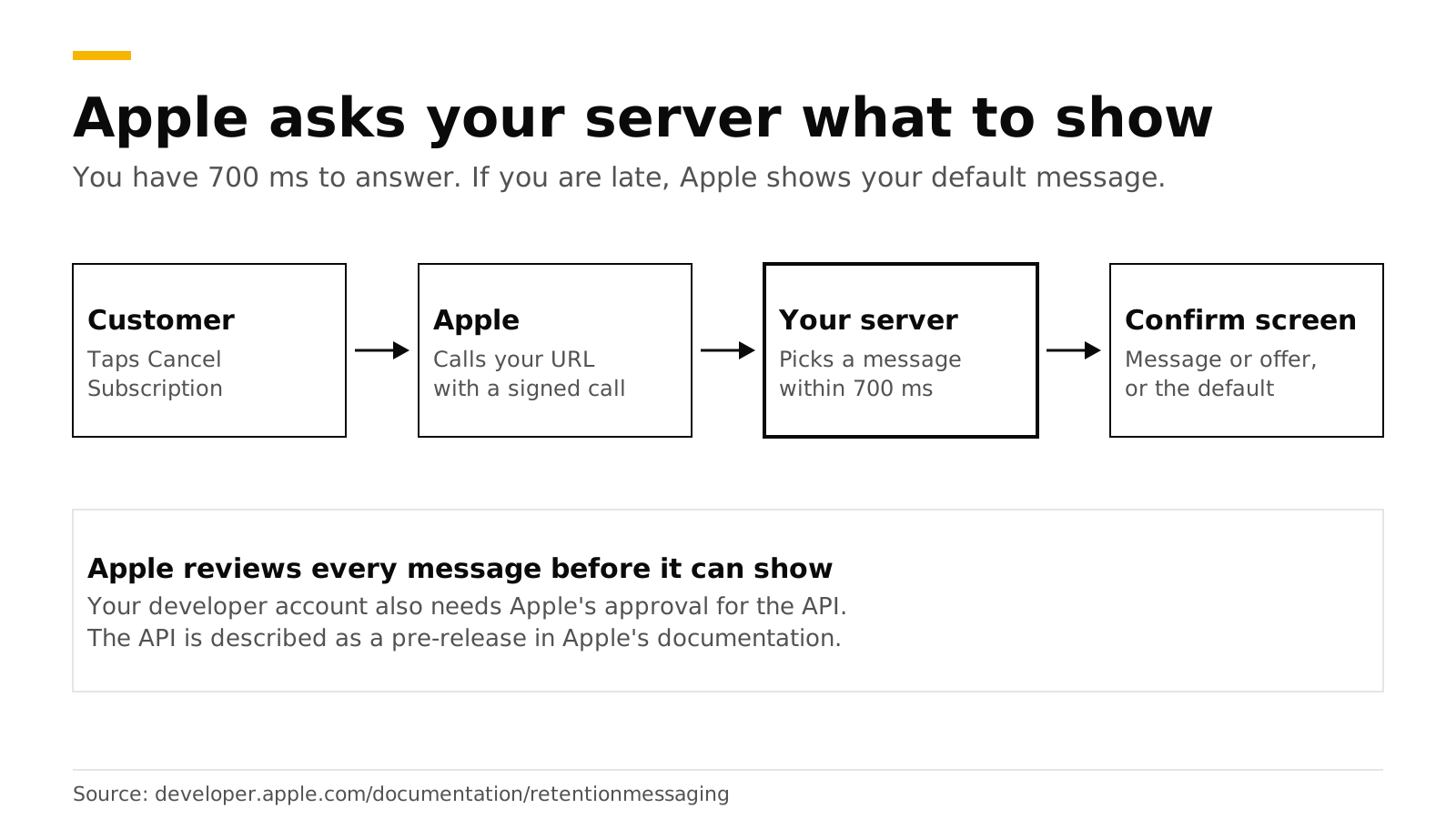
Apple's Retention Messaging API lets your server choose the message a customer sees on the App Store's Confirm Cancellation page. When a subscriber taps Cancel Subscription in their Apple account, Apple can call your server, you pick a message in under 700 milliseconds, and Apple shows it. The message can be plain text, a suggested cheaper plan or a promotional offer. Apple reviews every message first, and Apple's documentation still calls the API a pre-release that you request access to.
This post explains how the API works, what approval means, and how to set it up with RevenueDot under Lifecycle > Retention. Every Apple fact links to Apple's documentation and was checked in October 2026.
The short answer#
- What it is: a server-to-server service that selects which message the system shows when a customer views subscription details and might cancel (Apple).
- Where it shows: on the Confirm Cancellation page after the customer taps Cancel Subscription. They can continue to cancel, tap Keep Subscription, redeem an offer or take a suggested plan (same source).
- Four message types: text only, text with an image, switch plan and promotional offer.
- Approval: Apple sends every uploaded message for checking and shows only those in the
APPROVEDstate (Apple). Apple's documentation also calls the API a pre-release and tells you to request access. - Speed: your real-time answer must arrive within 700 ms in production, or Apple shows your default message.
- In RevenueDot: add messages, defaults and real-time rules under Lifecycle > Retention > Apple Retention Messaging API, then select Sync to Apple.
How does the Retention Messaging API work?#
You prepare messages ahead of time, and either let Apple show a default for each product and locale, or answer in real time with the message that fits each customer.
- You upload messages. Each has header text and body text, and some have an image. Messages go to Apple automatically for checking.
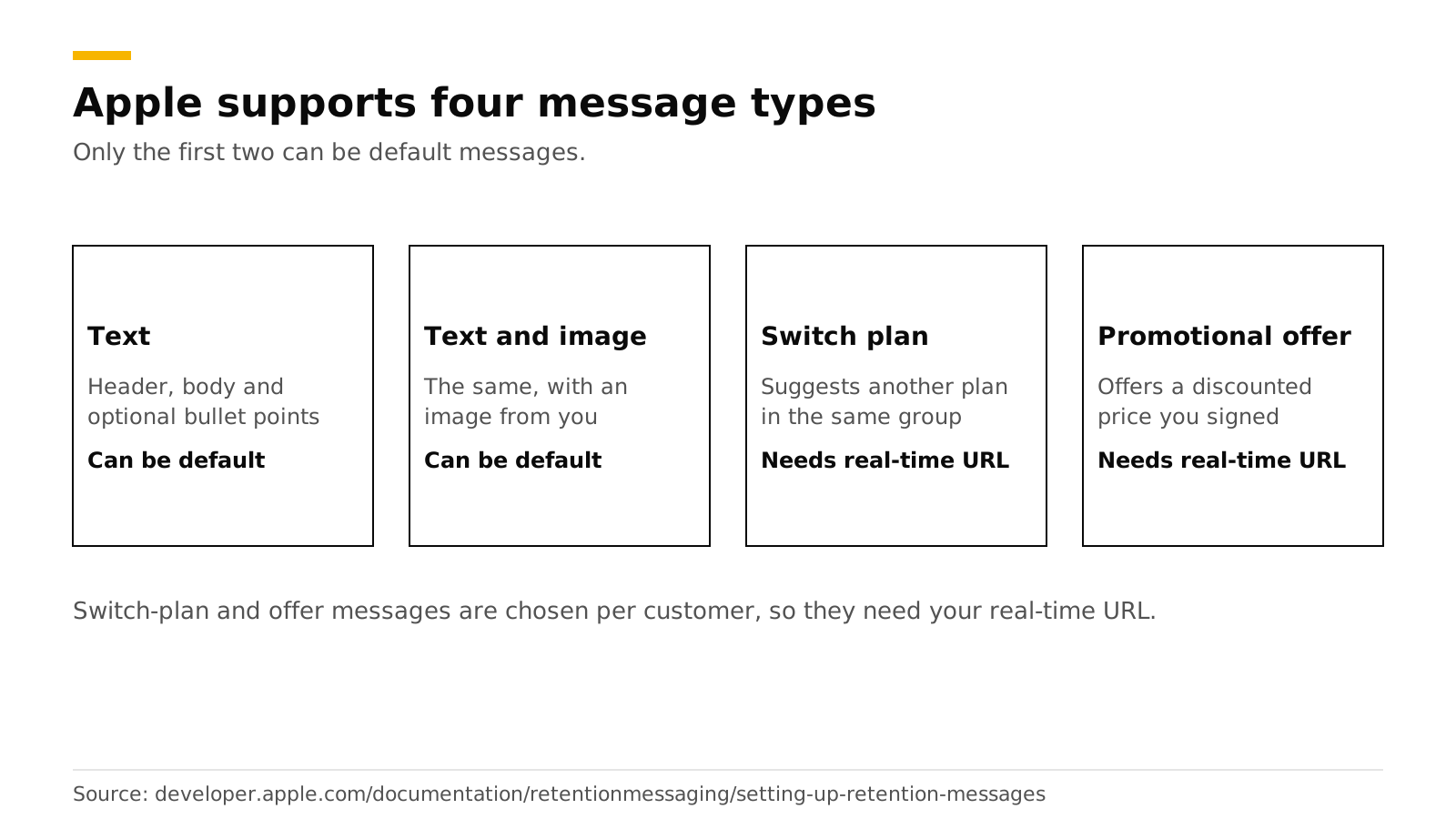
- You set a default message for every auto-renewable subscription in every locale. Only text messages, with or without an image, can be defaults.
- You optionally add a real-time URL. Apple sends a POST to your Get Retention Message endpoint when a customer views subscription details. The request is a signed JWS payload with the product id, locale, original transaction id and other context. You answer with a
RealtimeResponseBodyand a 200 status (Apple). - Apple falls back to your default if the real-time call fails for any reason, including a timeout.
Apple lists these supported systems: iOS 15.1 or later, iPadOS 15.1 or later, visionOS 1 or later and macOS 14 or later (Apple). Messages exist in nine locales: de-DE, en-US, es-419, fr-FR, it-IT, ja-JP, ko-KR, pt-BR and zh-CN (Apple).
What message types exist?#
| Type | What the customer sees | Default allowed | Needs real-time URL |
|---|---|---|---|
| Text | Header, body and optional bullet points | Yes | No |
| Text with image | The same, with your image | Yes | No |
| Switch plan | Text plus a suggested subscription | No | Yes |
| Promotional offer | Text plus a discounted promotional offer | No | Yes |
A switch-plan message must suggest a subscription in the same subscription group as the customer's current one. A promotional-offer message needs a promotional offer created in App Store Connect, and your answer includes the offer's signature and the message id (Apple).
Who can use it, and what does approval mean?#
There are two separate approvals. Do not confuse them.
- Access to the API. Apple's documentation describes the API as a pre-release and tells developers to express interest through its request-access page (Apple). The page needs an Apple Developer sign-in. RevenueDot's dashboard warns that until Apple approves your account, syncing fails with an Apple error.
- Approval of each message. Uploaded images and messages go to Apple for checking, and the system shows only
APPROVEDcontent. Apple also warns against uploading misleading or inaccurate content.
A third gate applies to real-time answers. Your server must pass a performance test in the sandbox environment before you can set a real-time URL for production. Apple runs it against your endpoint, and the response time threshold comes back in the test configuration, about 700 ms (Apple). In production, a late answer means Apple uses your default (Apple).
Apple's changelog shows the API is moving fast. It started as a pre-release on July 16, 2025, added the performance test on December 9, 2025, added the real-time URL endpoints on March 31, 2026, and added 12-month commitment plans to switch-plan messages on April 27, 2026 (Apple). Read the changelog before you build, since the details can change.
Apple limits the call rate per hour per app. The sandbox gets 10% of the production limits, and a request over the limit gets HTTP 429 with a Retry-After header (Apple).
How do you set it up with RevenueDot?#
RevenueDot hosts the real-time URL, signs offers and keeps your messages, so you do not build the endpoint yourself. Our retention guide has the full steps.
- Request access from Apple first, at Apple's request-access page.
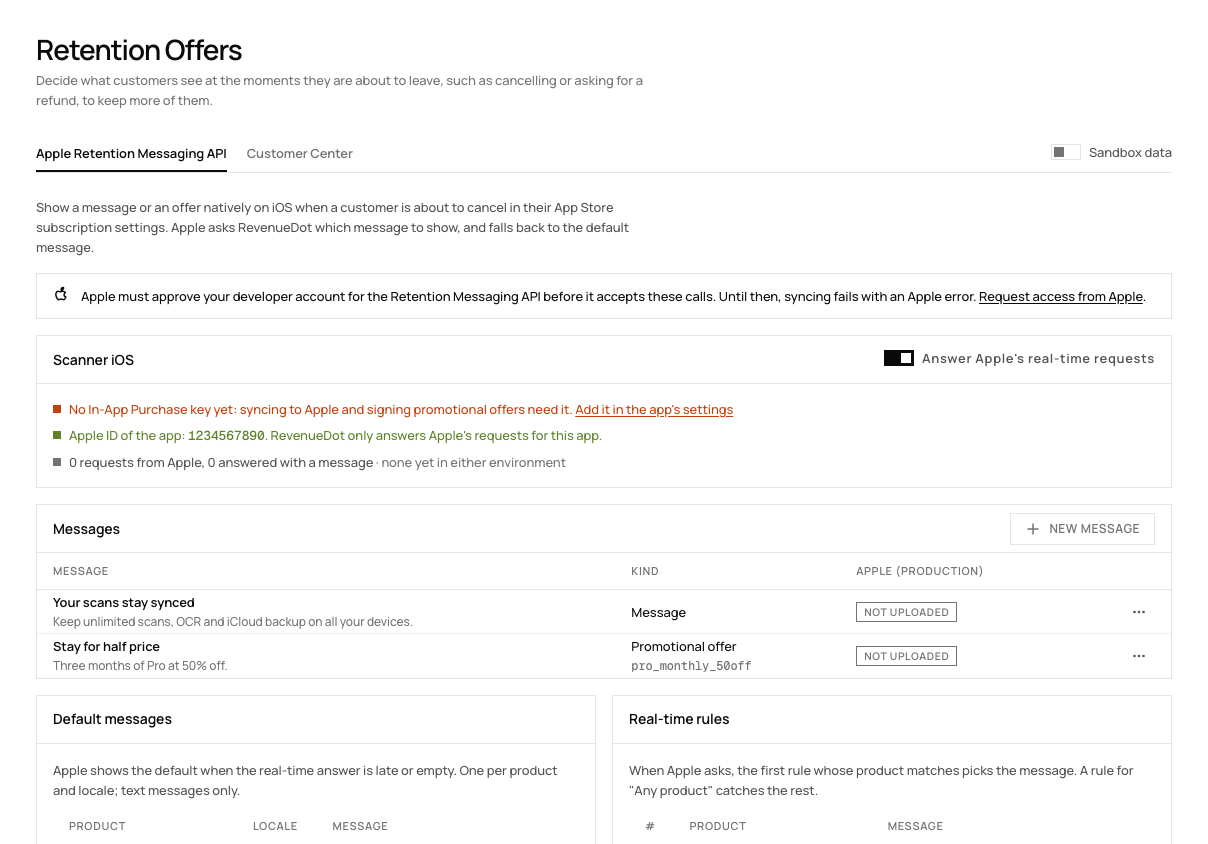
- Open Lifecycle > Retention > Apple Retention Messaging API and pick the App Store app. The app needs its In-App Purchase key (connect the App Store) and its Apple ID, the number in its App Store URL.
- Add messages. Each has a header of up to 66 characters and a body of up to 144 in RevenueDot's editor. A message can also suggest another plan or carry a promotional offer.
- Set a default message for each product and locale. Apple shows it when the real-time call fails. Defaults must be plain messages.
- Add real-time rules. For a product, or any product, choose which message to answer with. The first rule whose product matches wins, and a rule for "Any product" catches the rest.
- Select Sync to Apple (sandbox). RevenueDot uploads the messages, sets the defaults and registers its real-time URL,
https://<your server>/v1/retention/apple/<app id>. - Pass Apple's performance test, then select Sync to Apple (production).
What RevenueDot does on each call: it checks Apple's signature and app id, refuses a request signed more than 5 minutes earlier, and answers within Apple's 700 ms limit. Production requests are answered only once the app's Apple ID is set. If a promotional offer cannot be signed, for example because the key is broken, RevenueDot answers with no message and Apple shows your default. A promotional offer answer is signed with your In-App Purchase key. An uploaded message cannot change, so add a new one to change the text.
Before you rely on it. Apple sends real traffic only after it approves your account for the Retention Messaging API. The App Store Save Outcomes chart reads zero until that happens (charts guide). Run the sandbox sync and the performance test before you rely on it.
Customer Center or Apple's cancel screen?#
Use both. They reach customers in different places.
| Customer Center offer | Apple Retention Messaging | |
|---|---|---|
| Where it shows | In your app, before the customer cancels | On Apple's Confirm Cancellation page |
| Who sees it | Customers who cancel from your app screen | Customers who cancel in their Apple account |
| Message types | An offer, with a survey | Text, image, switch plan or offer |
| Approval | Promotional offer set up in App Store Connect | Apple's access approval, message review and performance test |
| Platform | iOS and Android | Apple platforms only |
| RevenueDot location | Lifecycle > Retention > Customer Center | Lifecycle > Retention > Apple Retention Messaging API |
A customer who cancels in their Apple account never opens your in-app screen, which is why the Apple page matters. Our post on reducing subscription churn shows how the two fit with win-back campaigns and billing grace periods.
What should a good retention message say?#
Say one true thing that is specific to the product. Apple tells you not to upload misleading or inaccurate content, and the safest messages are plain.
- Name what they lose. "Your scans stay synced. Keep unlimited scans, OCR and iCloud backup on all your devices."
- State an offer exactly. "Stay for half price. Three months of Pro at 50% off." Create the promotional offer in App Store Connect first.
- Suggest a plan that fits. A switch-plan message to a cheaper tier in the same group is a real alternative, not a trick.
- Do not hide Cancel. The customer can still continue canceling.
Test the outcome with the App Store Save Outcomes chart once Apple sends traffic, and read the churn rate chart over the same period. For one-offer-at-a-time testing, see the A/B testing guide.
Do it with RevenueDot#
- Create a free project and add your App Store In-App Purchase key (connect your app).
- Request access to the Retention Messaging API from Apple.
- Write two or three messages and a default for each product and locale.
- Add a real-time rule and sync to the sandbox.
- Pass Apple's performance test and sync to production.
- Watch churn and the save outcomes chart.
Start free on RevenueDot Cloud (free up to $10,000 monthly tracked revenue). The Customer Center feature page covers the in-app side.
FAQ#
What is Apple's Retention Messaging API?#
It is a server-to-server service that lets you choose the message shown on the App Store's Confirm Cancellation page when a customer is about to cancel. Messages can be text, a suggested plan or a promotional offer, and Apple reviews each one.
Do I need Apple's approval to use it?#
Yes. Apple's documentation describes the API as a pre-release and asks you to request access. Apple also checks every message you upload and shows only approved ones.
How fast must my server answer?#
Within 700 milliseconds in production. If the call fails or is late, Apple shows the default message you set for that product and locale.
Can the message include a discount?#
Yes. A promotional-offer message pairs text with a promotional offer you created in App Store Connect. Your server answers with the signed offer and the message id, which RevenueDot does for you.
What does it cost in RevenueDot?#
Nothing extra. It is part of RevenueDot, and RevenueDot Cloud is free up to $10,000 of monthly tracked revenue. Self-hosting is free under AGPL-3.0.
About RevenueDot. RevenueDot is an open-source (AGPL-3.0) backend for in-app purchases and subscriptions that works with the RevenueCat SDK. Start free on RevenueDot Cloud, free up to $10,000 in monthly tracked revenue, or self-host it with Docker and Postgres. Point the SDK's proxy URL at RevenueDot and keep your app code, your offerings and your customers. Read the quickstart or the code on GitHub.